


A practical guide and free template for security, IT and HR leaders who need an AI policy employees will actually follow.
Your people already use AI at work, whether or not you have a policy for it. Most organizations respond with a long document full of rules that nobody reads, or a blanket ban that pushes AI use out of sight. Neither protects your data. This guide shows why AI policies fail, the six mistakes behind most of them, and how to turn a policy into controls you can actually check. It includes a free, one page AI acceptable use policy template you can copy, edit and roll out this quarter, and ends with a five minute test to see how your current policy holds up.
Who This Guide Is For
The guide is written for CISOs, CIOs, heads of IT and HR leaders who are responsible for how employees use AI tools at work.
It draws on what Sennovate’s identity and security teams see across enterprise environments, and on current research from IBM and Microsoft. Since 2007, Sennovate has secured more than 10 million identities and delivered over 1,000 integrations.
Why AI Acceptable Use Policies Break Down
Most AI policies are written to show that rules exist. Employees need a policy that tells them what they can do, not just what they can’t.
Employees Already Use AI
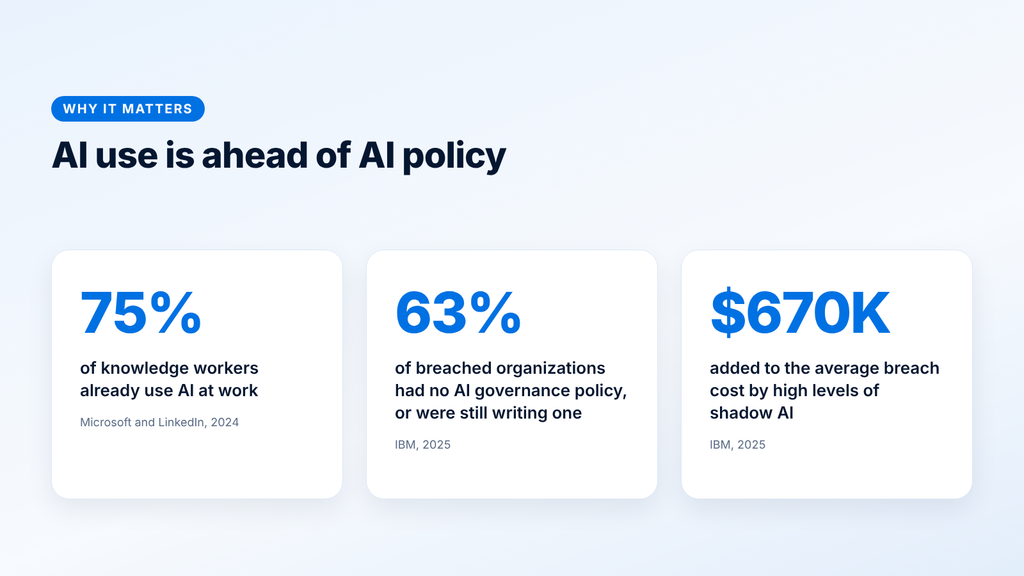
Microsoft and LinkedIn’s Work Trend Index found that 75% of knowledge workers already use AI at work, and 78% of those users bring their own AI tools rather than waiting for approved ones. Only 39% have received AI training from their company.
Most Organizations Still Have No Policy
IBM’s 2025 Cost of a Data Breach Report found that 63% of breached organizations either had no AI governance policy or were still developing one.
Policies Exist, But Nobody Checks
Among organizations that do have AI governance policies, only 34% regularly audit for unsanctioned AI use, according to the same IBM report. A policy that is never checked is a suggestion. Read more: AI Governance in 2026
Shadow AI Costs More
IBM found that one in five organizations reported a breach involving shadow AI, and a high level of shadow AI added about USD 670,000 to the average cost of a breach.
The bottom line:
A ban moves AI use out of sight. A long policy gets ignored. What works is a short policy that names approved tools, protected data, output checks and a way to report problems, backed by controls you can verify.
The Six Mistakes That Make AI Policies Fail
Each mistake below is a place where a well meant policy stops protecting anything. Read them with your current policy in mind.
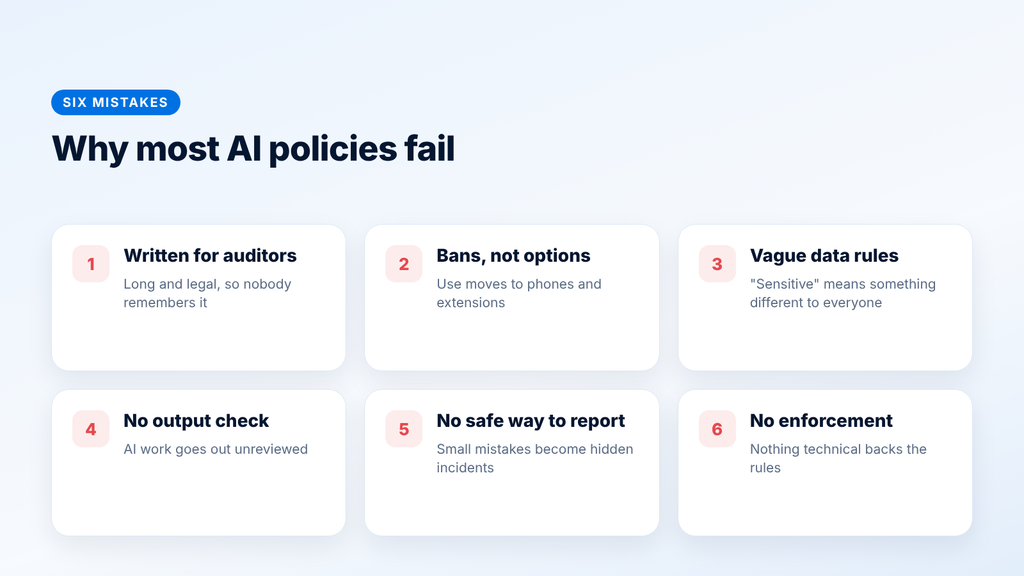
1. Written for auditors, not users.
A ten page policy full of legal language shows a rule exists. It does not change what an employee does at 4 p.m. with a deadline and a chatbot open. If people can’t remember the rules, they can’t follow them.
2. Bans instead of options.
Blocking popular AI tools without offering an approved alternative pushes people to personal phones, browser extensions and AI features inside other apps. The use continues; you just lose sight of it. Read more: Shadow AI in 2026
3. Vague data rules.
“Don’t share sensitive information” means something different to everyone. Unless the policy names the data that can’t go in, such as customer records, source code and credentials, people will guess.
4. No one checks the output.
AI writes code, contracts and customer replies that can be wrong, biased or confidential. If the policy doesn’t say who reviews AI work before it leaves the company, nobody does.
5. No safe way to report mistakes.
When someone pastes the wrong file into a chatbot, the worst outcome is silence. Without a named contact and a no blame rule, small mistakes become hidden incidents.
6. Policy without enforcement.
A policy states intent. Only controls, such as single sign on, data loss prevention and access reviews, decide what actually happens. If nothing technical backs the policy, it is not in effect.
From Policy to Practice
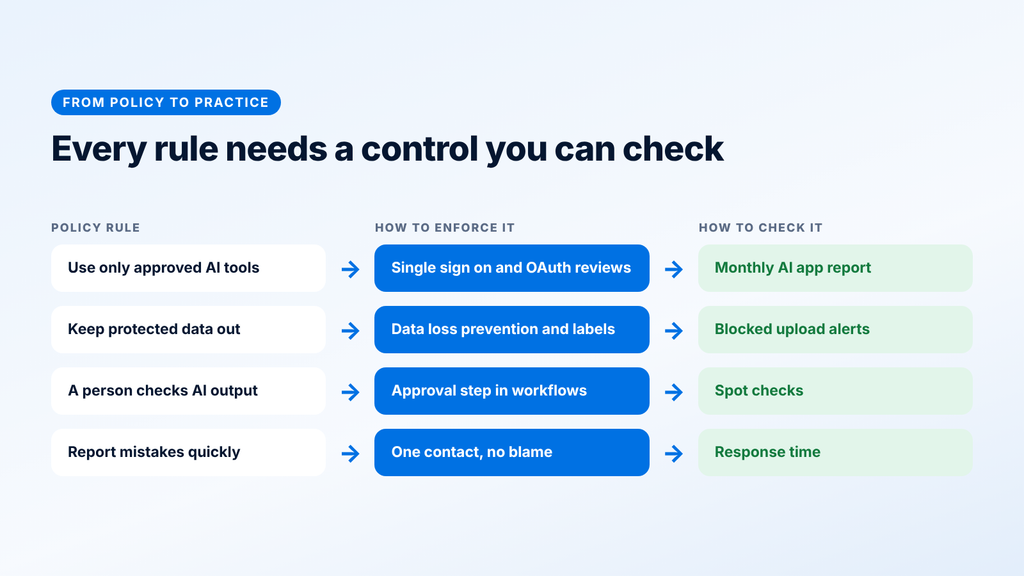
Every rule in your AI policy should map to a control you can check. Here is how the core rules translate.
| Policy rule | How to enforce it | How to check it |
|---|---|---|
| Use only approved AI tools | Single sign on for approved tools; review OAuth grants and browser extensions | Monthly report of AI apps connected to work accounts |
| Keep protected data out of AI | Data loss prevention rules on prompts and uploads; sensitivity labels | Alerts on blocked uploads; quarterly sample review |
| A person reviews AI output before it reaches a customer | Approval step in workflows for customer facing content and code | Spot checks of published AI assisted work |
| AI tools get only the access they need | Least privilege and scoped permissions for AI assistants and agents | Include AI tools and agents in access reviews |
| Report mistakes quickly | One named contact and a simple reporting form | Track reports and response time |
| New AI tools are reviewed before use | A short request and review process | Count of requests approved, declined and pending |
The One Page AI Acceptable Use Policy Template
Copy the template below, replace the bracketed text and remove any section that doesn’t apply. Keep it to one page.
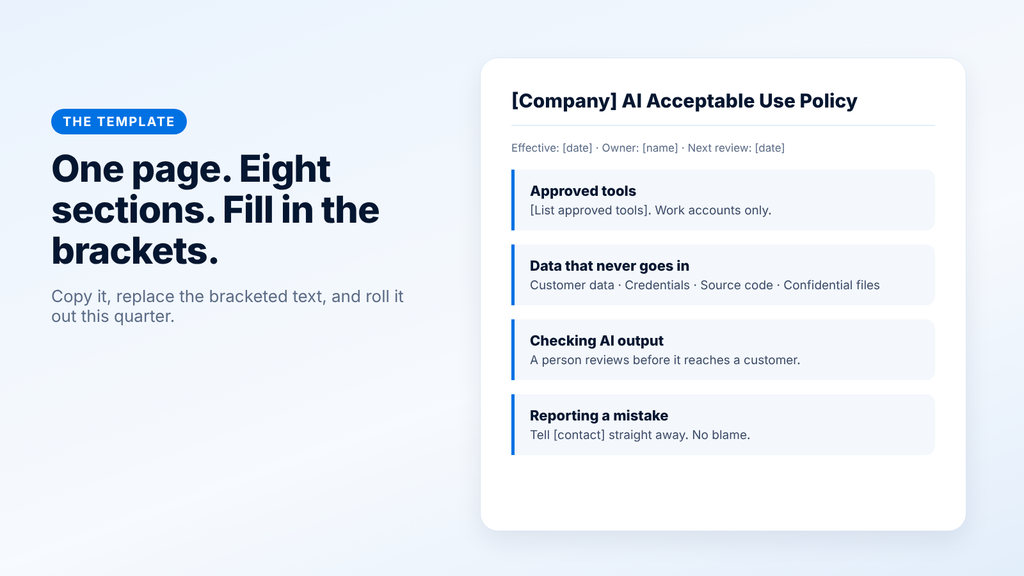
[Company name] AI Acceptable Use Policy
Effective date: [date] · Owner: [name and role] · Next review: [date, at least every 6 months]
1. Why this policy exists We want everyone at [Company name] to use AI to work faster and better, while keeping our customers’ data, our intellectual property and our reputation safe.
2. Who it covers All employees, contractors and partners who use AI tools for [Company name] work, on any device.
3. Approved tools You may use these AI tools for work: [list approved tools and versions]. Sign in with your work account only. To request a new tool, contact [team or form]. Personal AI accounts must not be used for company work.
4. Data you must never put into AI tools
- Customer or employee personal information
- Passwords, API keys, tokens or other credentials
- Source code from [named repositories], unless the tool is approved for code
- Financial results before they are public
- Contracts, legal documents or anything marked confidential
- [Add your own protected data types]
5. Checking AI output You are responsible for any work you produce with AI. A person must review AI generated content before it reaches a customer, is published or is used in code that goes live. Check facts, check for confidential information, and never present AI output as verified fact without checking it.
6. AI agents and integrations No AI agent, plugin or integration may connect to company systems or data without approval from [IT or security team]. Every approved agent has a named owner and only the access its task needs.
7. Reporting a mistake If you put the wrong data into an AI tool, or AI produces something harmful, tell [named contact or channel] straight away. Reports are handled without blame. The sooner we know, the easier it is to fix.
8. What happens if the policy isn’t followed Most issues are handled with guidance and training. Repeated or deliberate breaches are handled under [HR policy name].
Questions? Contact [name, team or channel].
Supporting Tables for Your Policy
These two tables help employees apply the policy day to day. Add them as an appendix or link to them from your intranet.
AI tool tiers
| Tier | What it means | Examples |
|---|---|---|
| Approved | Use for work with your company account | [Enterprise AI assistant, approved coding assistant] |
| Limited | Use only with public or non sensitive information | [Free AI tools for brainstorming or public research] |
| Not allowed | Do not use for any company work | [Unreviewed browser extensions, personal AI accounts] |
What data can go into approved AI tools
| Data type | Approved tools | Limited tools |
|---|---|---|
| Public information | Yes | Yes |
| Internal, non sensitive work | Yes | No |
| Confidential or customer data | Only if the tool is approved for it | No |
| Credentials and secrets | Never | Never |
The Five Minute Policy Test
Give yourself one minute per question, and score one point for every clear yes.
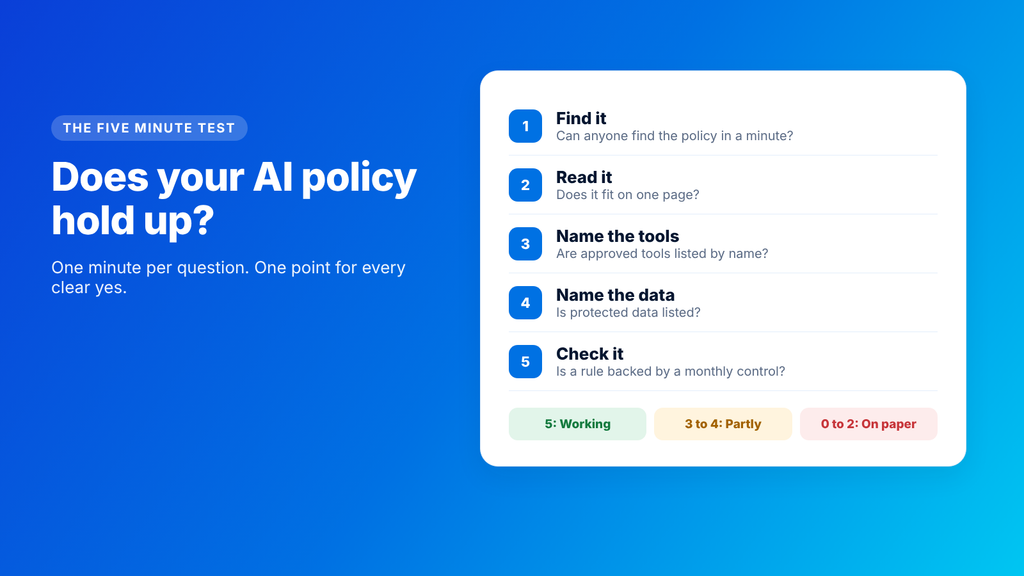
- Find it. Can an employee find your AI policy in under a minute?
- Read it. Does it fit on one page, in plain language?
- Name the tools. Does it list the approved AI tools by name?
- Name the data. Does it list the data that must never go into AI?
- Check it. Is at least one rule backed by a control you review every month?
Your score
- 5, Working policy: test your controls next, starting with AI agents and integrations.
- 3 to 4, Partly working: fix the gaps, usually the named data and the controls.
- 0 to 2, Policy on paper: start with Days 1 to 30 of the plan below.
A 90 Day Rollout Plan
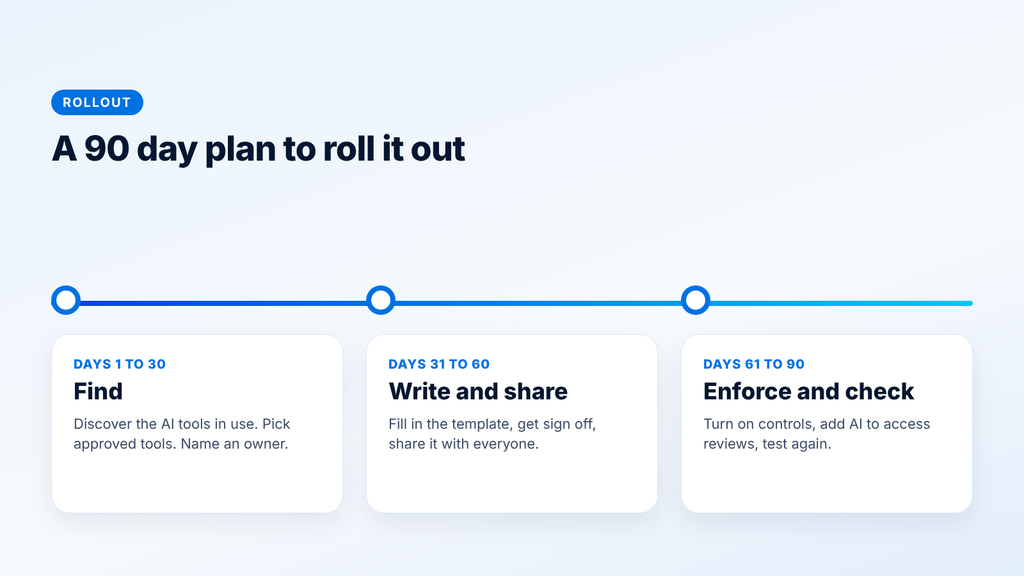
- Days 1 to 30, Find. Discover which AI tools are already in use through single sign on logs, OAuth grants, browser extensions and expense reports. Choose your approved tools and name a policy owner.
- Days 31 to 60, Write and share. Fill in the template, get sign off from security, legal and HR, and share it in a short all hands session or video. Give everyone the approved tools on the same day.
- Days 61 to 90, Enforce and check. Turn on single sign on for approved tools, add data loss prevention rules for protected data, include AI tools and agents in access reviews, and run the five minute test again.
What You’ll Gain
75% of knowledge workers already use AI at work (Microsoft and LinkedIn Work Trend Index 2024)
63% of breached organizations had no AI governance policy or were still developing one (IBM 2025)
USD 670,000 added to the average breach cost by high levels of shadow AI (IBM 2025)
A Policy People Remember One page and plain language means employees know the rules when it matters.
Safe Options, Not Workarounds Approved tools give people somewhere to go, so AI use stays visible.
Rules You Can Prove Every rule maps to a control, so you can show auditors, customers and your board that the policy works.
Faster, Calmer Incident Response A no blame reporting rule means mistakes surface in minutes, not months.
The result is an AI policy that protects your data and still lets your people move fast.
Frequently Asked Questions
What is an AI acceptable use policy? An AI acceptable use policy sets out how employees may use AI tools at work: which tools are approved, what data must never go into them, who reviews AI output and how to report mistakes.
Should we ban ChatGPT and other public AI tools? Bans usually push AI use onto personal devices and unapproved tools, where you can’t see it. Approving safe alternatives and setting clear data rules works better.
How long should an AI policy be? One page for the core rules, with an appendix for tool tiers and data types. If employees can’t remember the rules, they won’t follow them.
How often should we update our AI policy? At least every six months, and whenever you approve a major new AI tool or regulations change.
Does an AI policy cover AI agents? It should. Any AI agent or integration that connects to company systems needs approval, a named owner and only the access its task requires.
Have a Policy? Let's See If It Holds Up.
Sennovate's free AI Risk Assessment shows which AI tools are really in use across your organization, what data they can reach, and where your policy needs controls behind it.
Get Your Free AI Risk Assessment