Passwords like “123456” or ”abcd” are easy to remember for your online accounts, but passwords like these make your online accounts easy to hack where all your online identity and data reside. There are several ways hackers can use to crack your account passwords make your profile less secure and expose your online data to millions of internet users. So, let’s look at the steps you need to take for better passwords and ways you can avoid your accounts from being hacked?



Here are 10 ways to make sure your password is secure
1. Use Passphrases Instead Of Passwords
Passphrases are nothing but a sequence of text used to access a computer or program. A passphrase is just like a password but is longer than usual for improved security. It is good to have a strong password for your accounts, but for security conscious users using passphrases instead of passwords is better as it helps in easy retention of passwords.2. Make Use Of Biometric Authentication To Make Passwords A Thing Of The Past.
Biometric authentication relies on the uniqueness of the biometric qualities of each person it helps reduce false positive logins and improves security for your account. Biometric authentication makes usage of passwords obsolete when trying to access applications. Biometric data should be stored on the device and used as a transmission to critical data over the internet is not a good idea and might be vulnerable to attacks.
3. Keep your passwords Lengthy
Your passwords must always be lengthy to make it hard for hackers to guess and brute force your account. A longer password offers more protection than a comparatively short password if it is properly made. Avoid having consecutive keyboard combinations (i.e., qwertyuiop or zxcvbnm). Making your password long and easy to remember but hard to guess is the key to password security.4. Utilize services that offer Single Sign On (SSO) and Security Key based Login
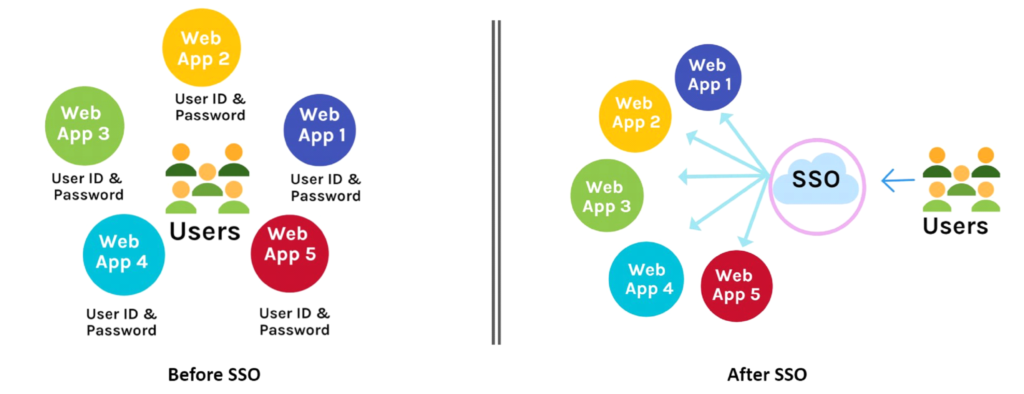
SSO enables single click access to applications where you don’t need to enter passwords every time you log in to an application. It increases efficiency and improves ease of access. SSO automatically authenticates and provides user access to the application without any additional login steps.
5. Ensure High Entropy Of The Password
Password entropy is measured as the degree of randomness and obfuscation did on a password in to a unique and secure from brute-force and other login-based attacks. Password entropy is generally determined by the usage of different characters which can be lowercase, uppercase letters, numbers as well as symbols. High entropy ensures that a password is hard to crack and makes it strong. An example of how you can improve the entropy of password is by replacing standard letters with numerals or special characters and make an informal language of your own like writing $ENN0V@TE instead of sennovate. – Online tool that you can use to do this: https://github.com/s0md3v/Locky6. Enable Obfuscation Where You Can in your passwords
Obfuscating in simple terms is trying to make something obscure and obfuscation merely converts a plain text value into an illegible value that is harder to read and will be less likely to be retained by a casual observer. Obfuscating passwords helps to improve your password strength. But obfuscating passwords can be hard to remember. A tool that allows you to obfuscate passwords- https://github.com/shagunattri/pwGen
7. Enable Multi-factor Authentication (MFA) for all your accounts
MFA is an additional step of authentication to better secure your accounts. MFA adds an additional layer of security to your account and enables better security. In most cases, it is a step that requires information about either- A thing that you have
- something that you know
- A quality you possess
8. Store passwords in a password manager
Password managers are a great way to store all your passwords in one place . They make the device remember and store all passwords. Even though using a password manager feels like a security risk, using good password managers does better than harm. Unix systems have a pass (1) that can be used as a password manager. Many good cross-platform password managers will do all the heavy lifting for you to better secure your accounts online.
9. Do not include personal info
Do not choose passwords with information that may not be as confidential as you’d think, such as your native language, your pet, or your phone number. Passwords are your gateway tokens to access an application, and you must make it as secure as possible. Using personal info such as your pet’s name, your company name and other details will not help in making a strong password/passphrase.10. Maintain Internet and Password Hygiene and only use HTTP(S) enabled sites
Having good Internet and password hygiene is essential to reduce risks for a potential hacking attempt on your account. Try using sites that you trust and ones that are regularly updated. One way to do this is always to use sites that have an `HTTPS` connection enabled and only enter passwords in HTTP based sites if you trust the concerned stakeholders and the site operators. Also, always look for a site certificate to avoid phishing attempts and reduce the risks of a password breach. You could use a temporary mail service for use-and-throw accounts on sites that you don’t often use or don’t trust. In conclusion, one size does not fit all hence Sennovate pays keen attention to their customer’s infrastructure and provides customized service. Sennovate delivers custom identity and access management solutions to businesses around the globe. Sennovate ensures to provide a seamless experience with integration across all cloud applications, and a single price for product, implementation, and support. Have questions? The consultation is always free. Email [email protected] or call us at: (925) 918-6618Having any doubts or want to have a call with us to know more about Password-Security?
Contact us right now by clicking here, Sennovate’s Experts will explain everything on call in detail.
You can also write a mail to us at [email protected] or call us on +1 (925) 918-6618.
About Sennovate
Sennovate delivers custom identity and access management (IAM) and managed security operations center (SOC) solutions to businesses around the world. With global partners and a library of 2000+ integrations, 10M+ identities managed, we implement world-class cybersecurity solutions that save your company time and money. We offer a seamless experience with integration across all cloud applications, and a single price for product, implementation, and support. Have questions? The consultation is always free. Email [email protected] or call us at: +1 (925) 918-6618.Related Articles

Top 10 Vulnerability Management Tools for 2026: Prioritization, Remediation, and Cost
Discovered vulnerabilities have outpaced the ability of human security teams to remediate by 2026. The...